Add and organise your listings
Add a listing by hand, from a link or from a platform, and how places and listings fit together.
Add a listing
- 1Open Listings and press Add listing.
- 2Choose where it is listed. From Airbnb, sign in and pick the listings to bring; from Booking.com or Szállás.hu, paste the property ID. Each one becomes a listing here, with its bookings.
- 3Or choose Add my listing myself: type the name, the address, what guests book and how many guests, or paste a link to its public page and press Use this.
After that you land on the listing. Add photos and a description there: Photos and details.
Places and listings
A property is a place; a listing is what a guest books there.
- An apartment or a house rented as a whole: one property, one listing (The whole place).
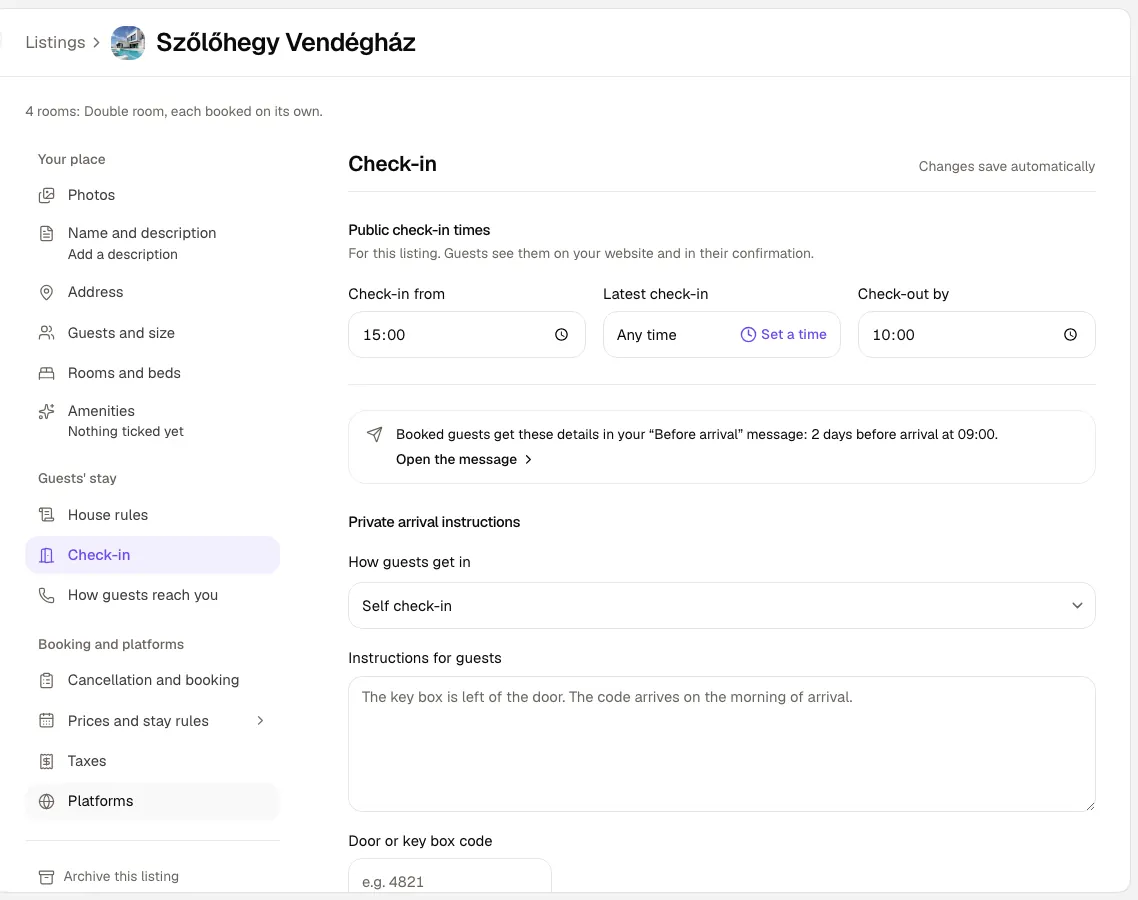
- A guesthouse: one property, with a listing for each kind of room (Rooms). Four identical double rooms are one listing with four rooms: the page says “4 rooms: Double room, each booked on its own.”
The listing page
Each listing in Listings shows its platforms and their state, the next booking, Edit listing and Calendar. Edit listing opens the page, in three groups. Changes save automatically.
| Group | Sections |
|---|---|
| Your place | Photos, Name and description, Address, Guests and size, Rooms and beds, Amenities |
| Guests’ stay | House rules, Check-in, How guests reach you |
| Booking and platforms | Cancellation and booking, Prices and stay rules (opens the Calendar), Taxes, Platforms |
Time zone and currency
Each listing has its own time zone (cancellation deadlines, payment due dates and scheduled messages follow it) and its own currency. New listings start with the defaults in Settings, then Business & taxes, then Currency & time zone.
Archive or remove
At the bottom of the listing page, Archive this listing takes it off the calendar and your website; bookings and invoices stay and you can restore it later. A property with connected platforms asks you to disconnect them first.
Remove on a listing works only when it has no upcoming bookings; it closes on every platform. Removed listings are listed with Restore.
Next: Rooms and your plan